
Web Fix On
Your WordPress, Our Priority – 24/7 Maintenance
Your WordPress, Our Priority – 24/7 Maintenance
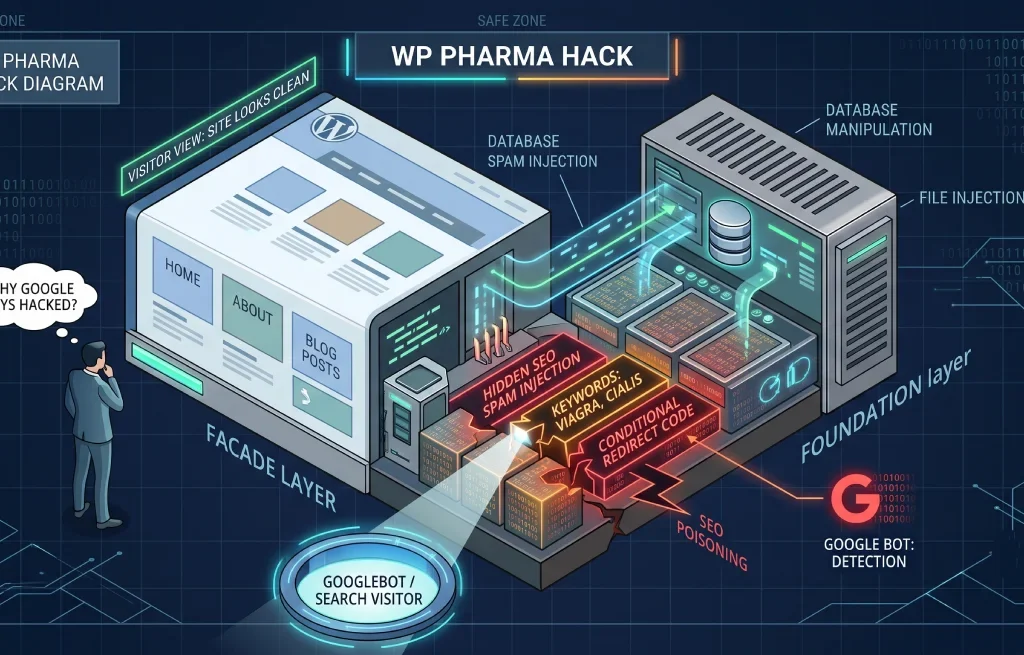
Someone tells you they searched your business name and Google offered them cheap Cialis.
You check. Your site is fine. Homepage loads, pages are normal, nothing’s changed. You log into WordPress and everything’s where you left it. No warnings, no weird posts, nothing.
They must be confused. Or their browser has something. Or they typed it wrong.
They didn’t. Your site is serving pharmaceutical spam to Google right now, and the only reason you can’t see it is that the malware checked who you were and decided you weren’t the audience.
The WordPress pharma hack is an SEO spam infection that injects pharmaceutical content — Viagra, Cialis, Xanax, and similar — into your site’s search listings while showing normal pages to human visitors. It uses cloaking to serve one version of your site to Googlebot and a completely different version to you.
You’ll also see it called the Google Viagra hack or the WordPress Viagra hack. Same infection, different name depending on which drug keywords the attacker chose.
The goal isn’t to break your site or steal your data. It’s to borrow your domain’s search authority. Your site has built up trust with Google over years; the attacker’s spam pages have none. So they hijack yours.
The scale is larger than most people assume. In 2024, Sucuri’s SiteCheck scanner detected over 422,000 websites infected with SEO spam, and WordPress accounted for 96.2% of all infected CMS websites. Pharma spam specifically made up more than 40% of SEO spam detections.
As one agency put it bluntly: <cite index=”26-1″>”Your website can fall victim to a security attack even if you’ve never done anything controversial at all.”</cite>
You’re not a target. You’re an opportunity.
This is the practical part, and it’s the step that turns “my site looks fine” into actual evidence.
Method 1: The search operator (30 seconds)
Search Google for:
viagra site:yourdomain.com
Then repeat with cialis, xanax, pharmacy, and pills. If anything comes back, you’re infected.
One catch worth knowing: Google’s policies mean infected sites often don’t surface on the first page of results. Scroll to pages three and four before concluding you’re clean.
Method 2: Impersonate Googlebot (2 minutes)
This is the one almost nobody explains, and it’s the fastest way to see the hidden content with your own eyes.
Install a User-Agent Switcher extension in Chrome or Firefox. Set your user agent string to Googlebot:
Mozilla/5.0 (compatible; Googlebot/2.1; +http://www.google.com/bot.html)Now reload your site and view the page source.
If you’re infected, the injected pharmaceutical links and keyword blocks will be sitting right there in the HTML — content that vanishes the moment you switch your user agent back to normal.
That’s the whole trick, exposed. The malware isn’t hiding the content from your server. It’s hiding it from you specifically.
Method 3: URL Inspection in Search Console
Open Google Search Console, run URL Inspection on your homepage, choose Live Test, and view the rendered HTML. This shows the page exactly as Googlebot fetched it. Same result, no extension needed.
Method 4: Check your indexed pages
Search site:yourdomain.com and compare the result count against what you’d expect. A 30-page site showing 900 indexed URLs has 870 pages you didn’t make.
Pharma hacks are unusually good at hiding. A few of their favorite tricks are worth knowing, because they explain why your scanner came back clean.
Inside the images folder. Spam files get dropped in /wp-content/uploads/ or an /images/ directory. Crawlers and scanners don’t expect executable files there, so many simply don’t look.
Behind a leading dot. Renaming a file to .somefile makes it hidden on most Linux systems. It won’t appear in a standard FTP listing unless you’ve specifically enabled hidden files.
In the database. Encoded payloads in wp_options, spam content in wp_posts, injected values in wp_postmeta. File scanners don’t read these.
In core-file lookalikes. A backdoor named wp-blog-header.php sitting in a directory where that file has no business existing. It looks legitimate at a glance because the name is legitimate — just not there.
In cron jobs. This is the reinfection engine. A scheduled WordPress task rewrites the malicious files on a timer, which is why deleting the visible spam does nothing. Two hours later it’s back and you have no idea why.
If you clean a pharma hack and skip the cron jobs, you have not cleaned a pharma hack.
Two jobs, and people consistently do only the first.
wp-content and wp-config.php./uploads/ and any /images/ directories for PHP files. They should contain media only.wp_posts and wp_postmeta for pharmaceutical terms, and check wp_options for oversized encoded entries.wp_options and remove anything you don’t recognize. Skip this and the infection restores itself..htaccess and wp-config.php for injected rules and code.wp-config.php.A warning on database cleanup: running bulk DELETE queries against wp_posts based on a keyword match is a genuinely dangerous operation. A slightly wrong query wipes legitimate content permanently. Test on a staging copy first, and if that sentence made you nervous, that’s the correct reaction — stop and get help rather than experimenting on a live database.
Your site can be spotless while Google still lists hundreds of pharma URLs, because Google doesn’t know they’re gone until it recrawls them.
These get confused constantly. They’re siblings, not strangers.
| Pharma hack | Japanese keyword hack | |
|---|---|---|
| Spam content | Viagra, Cialis, Xanax, pharmacy links | Japanese text, counterfeit luxury goods |
| Target audience | English-speaking search traffic | Japanese-speaking search traffic |
| Typical form | Injected links and content on existing pages | Thousands of new auto-generated pages |
| Cloaking | Yes | Yes |
| Entry points | Identical | Identical |
| Cleanup process | Identical | Identical |
The Japanese keyword hack attack, different merchandise. If you understand one, you understand both—and if you keep getting hit by one variant after cleaning another, that’s a strong sign the entry point was never closed.
Three possibilities, and they need different responses.
The cron job survived. The most common cause with pharma specifically. The scheduled task rebuilds the malware on a timer. You’ll see files reappear within hours of deletion, which is the tell.
The entry point is still open. The vulnerable or abandoned plugin is still installed. Attackers rescan sites they’ve already compromised.
Nothing came back. The site is clean and you’re looking at stale search results. Google hasn’t recrawled yet, or the spam URLs are still returning 200 instead of 410.
Test the last one before assuming the worst — check the actual status code your server returns for a spam URL. If it’s 200, that’s a configuration problem, not a reinfection.
| DIY | Professional cleanup | |
|---|---|---|
| Cost | Free, plus your time | $300–$3,000+ |
| Time | A full day minimum | Usually same-day |
| Riskiest part | Bulk database queries — one bad query is permanent | Handled on staging first |
| Cron job cleanup | Frequently missed | Standard |
| Search Console work | Usually skipped | Standard |
| Best when | Small site, clean backup, comfortable with phpMyAdmin | Business site, no clean backup, or it’s returned before |
The dividing line here is genuinely the database. File cleanup is tedious but forgiving — you can restore a file. A DELETE query that matched more rows than you expected is not recoverable without a backup, and by then you’re restoring an infected backup.
viagra site:yourdomain.com once a month. Ten seconds, and it’s the earliest warning you’ll get.We handle WordPress maintenance, security hardening, and malware recovery for businesses that can’t afford downtime..
Pharma hacks are a reinfection problem more than a removal problem. Finding the visible spam is straightforward; finding the cron job that rebuilds it, the dot-prefixed file in the uploads folder, and the entry point that let it all in is the actual work. We do that part, then handle the Search Console side so the spam URLs actually leave Google’s index rather than sitting there while your site is clean.
If your site has been cleaned once and the pharma spam came back, it’s rarely bad luck. Something specific was left behind, and it can be found.